





UtuCAD 1.4 version update guide

작성자 : manager
작성일 : 2024.07.31 17:00
조회수 : 1097
dc375f15987f0f7a5da6296a6c26c3b1_1722403054_0548.png
hello UTTU CADno see.

Korea's first developed pattern CAD
Easy to use anywhere 
UTTU CAD
Are you using it well?

UTTU CADVersion 1.4Notice regarding the updateI will give it to you. 
dc375f15987f0f7a5da6296a6c26c3b1_1722403090_9082.png 

(1) Reduction rate
Select a pattern or drawing line andDrag or Chat windowYou can adjust the zoom ratio using ).
dc375f15987f0f7a5da6296a6c26c3b1_1722403254_7678.png
dc375f15987f0f7a5da6296a6c26c3b1_1722403267_6596.png

(2) Fabric setting function
You can set the fabric by pattern in the pattern information window, andFabric LibraryYou can create and modify it.
dc375f15987f0f7a5da6296a6c26c3b1_1722403487_0446.png
dc375f15987f0f7a5da6296a6c26c3b1_1722403494_311.png
 
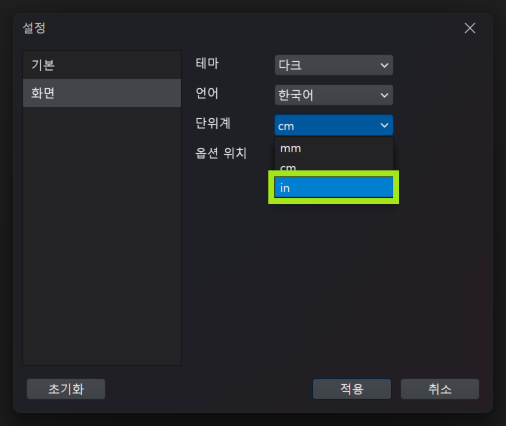
(3) inch unit system
[File - Settings]or bottom rightStatus barYou can change it at. 
Currently, inch units can be entered in decimal form.
dc375f15987f0f7a5da6296a6c26c3b1_1722404809_2388.png

(4) Adobe Illustrator (AI)Compatible with the program
Extension*.pdf / *.aiYou can load the file.
[File - Import - PDF / AI]After selecting, if you select a file with the corresponding extension, it loads all lines excluding images.
dc375f15987f0f7a5da6296a6c26c3b1_1722412071_552.png
also UTTU CADFiles worked on in also have the extensionYou can export it as a *.pdf file,
In Adobe Illustrator (AI)*.pdf When you open the file, it is loaded in the form of lines.
dc375f15987f0f7a5da6296a6c26c3b1_1722403111_4296.png
 
***UTTU CADIs Automatic update upon loginIt is possible.***
***UTTU NestPlease download and install it from the homepage.***

We will always do our best to provide even better CAD services.
thank you